

Hacking of intercoms Eltis, Vizit, Texkom, Metakom, Cyfral, Faktorial, Keyman
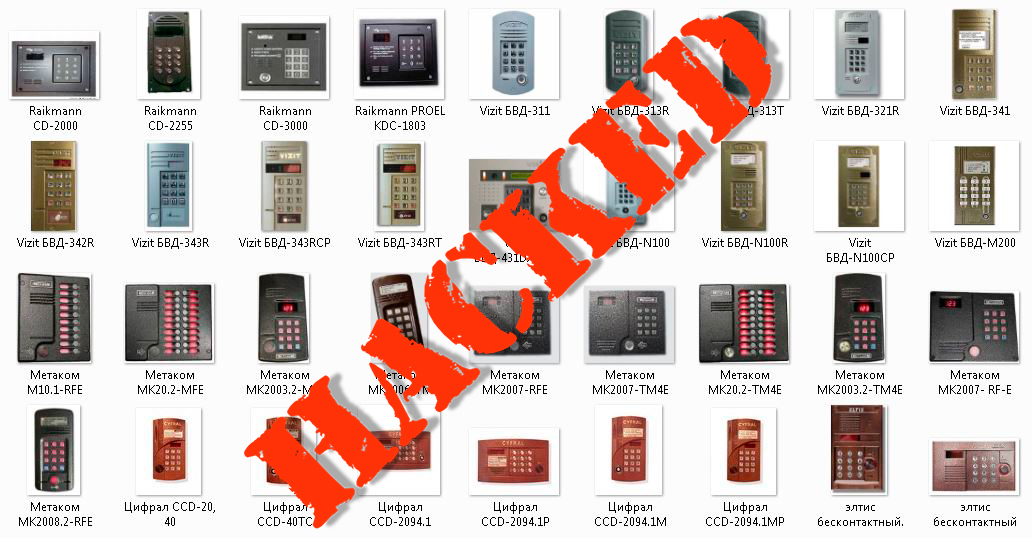
Everyone knows that public service workers open intercoms of a huge number of houses without carrying a huge bag with keys from all these devices. They use the input to the programming mode, in which opening the door is by no means the most complicated function.
Manufacturers do not pay enough attention to complicating access to the program mode, which makes it possible for an ordinary person who does not possess special professional skills in the programming of electronic devices to make keyless access to the entrances of apartment houses equipped with intercoms.
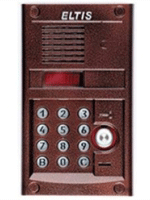
Hacking of doorphones "ELTIS"
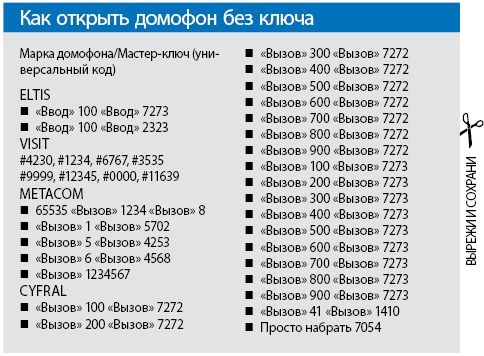
 Two quick and easy options: Call - 2323; The call is 7273.
Codes from Cyfral`a sometimes come to the doorphones of Eltis!
Codes may not work due to a master password change.
Calling up the system menu for the doorphone Eltis 'SYS':
- Press the 'B' button and hold for 7 seconds.
- After the inscription 'SYS' on the display, enter the system password (blunt lazy installers often do not bother changing the password, which by default is 1234)
If the input is correct, the intercom will show the firmware of the type '6_7x', where x is the firmware number, after the '_FUNC' menu is loaded.
From this menu:
- '1' - 'PAS' will appear, after the input field to change the old login password to this menu (dial 4 digits and the intercom will return to '_FUNC'
- '2' - menu '_ LOS' to enable / disable the common login password (1/0 buttons respectively)
- '3' - the menu '_ dig' to change the general login password. Press 3, 4 or 5, and '____C' appears. Depending on the button you pressed, you can set a new password, respectively, 3, 4 or 5 digit. (Type the new password)
- '4' - the menu '_beep'. This option enables / disables the opening signal of the individual apartment code in this apartment (the handset rings when opened by default code, buttons 1/0)
- '5' - does not exist
- '6' - the menu '_FLOC' to enable / disable individual entry codes for apartments (for verification, press' in 'in normal mode, if' F'-light is on)
- '7' - does not exist
- '8' - the menu '_OREN'- for changing the duration of the door opening (the number of signals will be changed, the number of signals will be increased / increased by the buttons from 1 to 9)
- '9' - does not exist
- '0' - output
Serial number of doorphone
- Press 'in' and hold for 20 seconds. 5 digits will appear and then reset.
Input of engineering code (system menu 'CODE' for work on apartments)
- 1) Dial any DIGI and keep it to the 'CODE' label, then a field for entering the password will appear;
- 2) Enter the system password (default is 1234 as in the first case);
- 3) If the input is correct, the firmware will appear, then the menu '_FUNC'.
From this menu:
- '1' - Set a new login password to this menu (similar to the first case, see above).
- '2' - Set a new shared password for logging in (4 digits).
- '3' - work on the passwords of the apartments: '_FUNC' -> click '3' -> 'F' -> enter the apartment number and press 'in' -> '____ C' -> enter the new code (but Not 0000, because by entering it, you will prohibit the use of the code for this apartment) -> go to the apartment dialing -> ask to press the button 'open the door' TWO times -> the code is accepted, '_FUNC'. '4', '5'- menu' __ LF ', but different options hide different numbers.
- '4' - disconnection / inclusion of individual tubes in the apartments. Dial the apartment number, then press 'in'. The '*** #' appears, where *** is the apartment number, and # is the number 1 or 0 (on or off). Click the value you want.
- '5' - key encoding. Dial the apartment number and press the 'в' button (see above). Appears '*** LF', where *** is the apartment number. Leave the key to the reader. If you have not previously encoded the key, the word 'ADD' will appear, if encoded, the apartment number will appear, to which key is written. After the encoding, you can open the door with this key after logging out.
- '6' - the menu '__ dF'. Option to delete keys. Dial the apartment and press the 'в' button. "_ DEL" appears, press 1- will display the number of keys that have been deleted. (* DEL). Press 0 to exit '_FUNC'.
- '7' - does not exist
- '8' - does not exist
- '9' - does not exist
- '0' - output
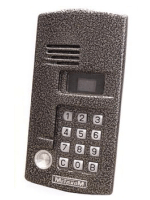
Hacking of Doorphones "METAKOM"
Three ways to open the doorphones "METAKOM":
- Pressing the call button, then dial the number of the first apartment in the entrance and again press the call button. The display should show letters COD, carry out a set of digits - 5702.
- 65535 - call - 1234 - 8.
- Call - 1234 - 6 - call - 4568.
Opening the door:
- B-1-B-5702
- B-5-B-4253
- B-6-B-4568
- B-1234567
- 65535-B-1234-B-8
Changing system passwords:
- 65535-B-1234-B-9-3-new code-B = Change the master password (default is 1234)
- 65535-B-1234-B-0-new code-B = Change the public password (default is 1234567)
- 65535-B-1234-B-flat-number-B-0-new code- B = Change of apartment password (for each own, default is 4 characters)
Working with keys:
- 65535-В-1234-В-В-flat number-В-7 = Key registration for apartment №
- 65535-В-1234-В-В-flat number-В-7-0-111 = Removal of all keys from apartment №
- 65535-B-1234-B-9-7-111 = Deletes all master keys
- 65535-B-1234-B-9-9 = Write a new master key
- 65535-B-1234-B-9-9-0-111 = Deleting a new master key
Doorphone entry codes:
- 65535-B-1234-B = Service menu
- 65535-B-1234-B-B = User menu
- 65535-B-1234-B-9 = System menu
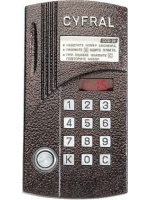
Hacking of Doorphones "CYFRAL"
Codes from Cyfral`a sometimes come to the doorphones of Eltis!
Codes may not work due to a master password change.
Two options for opening:
- If there is an "M" mark on the intercom. Press: 07054, or - call - 41, or - call - 1410.
- If there are three-digit rooms. Call - apartment number (100, 200) - call - 2323; 7272; 7273 (one of 3 numbers).
PIN codes for the Cyfral admin on Troyeschina:
- 9104 and 2904
Opening the door:
- B-100-B-7273
- B-200-B-7273
- B-300-B-7273
The access code to change the parameters and settings of the doorphone Cyfral CCD-2094M:
- First dial 0000 and press " in ", the word " cod " will appear.
- Then enter 123456 and press " in ".
- If the code is approached, " f0 " - system menu will appear.
Hacking of Doorphones "FACTORIAL"
The current way how to open the intercom Fictional:
- Press the numbers: 000000; 123456, in case of a failure, press - 5 - 180180 - call - 4 call.
Breaking up the Doorphones "Keyman"
The most problematic in accessing.
Effective way to open a doorphone Keyman:
- K - 100 - 789 - short sound - 123456 - 8
- K - 170862 - short sound - 0
Hacking of Doorphones "VIZIT"
With unchanged factory settings, there are 4 code options: * # 423;
12 # 345;
67 # 890;
4230 .
For access using the service menu: # 999 . After two intermittent signals, enter: 1234 (standard) , enter the following error: 0000;
9999;
3535;
12345;
6767 . The access signal is one sound, failure - two sounds.
The way to access the service menu with the help of three buttons: Press "2", (wait a couple of seconds), "#" (for a couple of seconds), "3535" - then the door is opened. After pressing "*" - exit from the program mode.
To open the door, you can try typing: * # 423 (not always suitable) .
The entrance to the service mode is simple enough for the VIZIT intercom: # 999-picet 2 times-enter the master code, default is 1234, if it comes up-peeps 1 time, if the code is incorrect, then a two-tone signal flashes and the red LED lights up.
Explanation of operations:
- 2-installation of individual codes for apartments
- 3-key programming for input
- 4-erasing keys from memory
- * -output from the mode
- # Confirm the installation (save changes).
- 1,5,6,7,8,9,0-does not exist.
Key coding (for example, if the master code came up):
- # 999 (2 peaks) 1234 (1 peak) 3 (1 peak) {apartment number} include the key (squeak) # and then *
The VIZIT intercoms also have a special mode in which you can change everything - even the master code!
The transition to this mode is carried out from the usual state so (taken from the instruction):
- Turn off the doorphone
- Disconnect the two wires "programming" in the central unit
- Turn on the power.
As can be seen from the above, the block with the buttons must be removed.
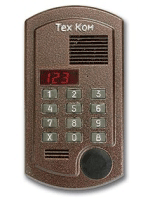
Hacking of the door phone "Tehcom"
When manufacturing, the following values are set (see Table 1 ):
| Table. №1 | |
| Range of apartment numbers | From 0 to 99 |
| Programming password | 1-2-3-4 (master_mod_change ..!) |
| General code | Disabled |
| Duration of the lock opening | 4 seconds |
| Individual codes | Disabled |
| Call volume levels | Level 3 |
| Memory of keys ТК-13М | Cleared |
| Ringing volume | The maximum |
| Type of lock | Lock without PU |
| * Any of these parameters can be changed. | |
To enter the programming mode, you must simultaneously press the buttons 2-5-8 and hold for a few seconds (button 2 is pressed first). Entering the programming mode is confirmed by highlighting on the "- - - -" indicator.
After that, enter the code 1-2-3-4 (factory setting of the programming password - Table No. 1 ). If the password is entered successfully, the indicator will show "F", if the password is incorrect, the intercom will go into standby mode. After entering the password, select the desired mode ( Table No. 2 ) and press the "B" button.
| Table. №2 | |
| Button | Mode |
| 0 | Enter a new password to enter the programming mode |
| 1 | Entering the number of the initial apartment |
| 2 | Erasing all apartment keys and public keys |
| 3 | Entering keys |
| 4 | Disconnecting the apartment tube |
| 5 | Enter or change individual ringer volume levels |
| 6th | Changing the signal level of the calling panel |
| 7th | Generic code prohibition |
| 8 | Enter or change individual codes |
| 9 | Enter or change the general code |
| 10 | Setting the opening time of the lock |
| eleven | Choosing the type of lock |
| 12 | Sound confirmation of opening the door with a key |
Where:
0 - enter the new password for the programming mode
After pressing the "0" button, "F0" is displayed on the display. Then press "B" (no indication).
Next, you need to dial a 4-digit password code and confirm it by pressing the "B" button.
If a new password was entered, it should be remembered and entered at the subsequent entry into the programming mode.
The value of the new password should not begin with the digit "0".
Operation is carried out at installation of an intercom and as required.
ATTENTION! If the password is lost, the possibility of further reprogramming the doorphone, including the addition of PROXI keys, will be lost and it will be possible to restore it only by contacting the manufacturer.
Exiting the mode - pressing the "X" button for 2-3 seconds.
1 - mode of entering the number of the initial apartment
After pressing the "1" button, "F1" will be displayed on the indicator. Then press button "B" (no indication).
Next, you need to dial a new value for the number of the initial apartment and confirm with the button "B".
(Shift is possible only by an integer number of tens).
Exiting the mode - pressing the "X" button for 2-3 seconds.
2 - key erase mode
After pressing the "2" button, "F2" will be displayed on the indicator.
Then press "B" (no indication). To erase the keys recorded by the apartment number, you need to dial the apartment number and press the "B" button.
Erase all data on previously registered keys for this apartment.
To erase the keys recorded in the common list, the apartment number is not entered, you have to press the "B" button twice.
Exiting the mode - pressing the "X" button for 2-3 seconds.
3 - mode of entering (adding) keys
After pressing the "3" button, "F3" will be displayed on the indicator. Then press "B" (no indication)
Apartment key entry:
Dial the apartment number and "B", then attach a recordable key, after reading and registering which will sound one beep. If the key is already registered in the call block, two beeps will sound and the intercom will wait for the next key. The apartment number is entered before each key.
Entering keys in the general list:
When displayed on the "F3" indicator, press "B" twice and enter the keys.
Operation is carried out at installation of an intercom and as required.
Exiting the mode - pressing the "X" button for 2-3 seconds.
4 - mode of switching off the tube of an apartment
After pressing the "4" button, the display will show "F4".
Then press "B" (no indication).
Dial the apartment number and press "B" (no indication).
Press: "1" or "2"; And button "B".
1 - corresponds to the included tube
2 - corresponds to the off-hook
Exiting the mode - pressing the "X" button for 2-3 seconds.
5 - input mode for ringing volume levels
After pressing the "5" button, the display will show "F5". Then press "B" (no indication).
Dial the apartment number and press "B" (no indication). Press: "1", "2" or "3"; And button "B".
1 - corresponds to low volume
2 - corresponds to the average loudness
3 - corresponds to a large volume
Exiting the mode - pressing the "X" button for 2-3 seconds.
6 - input mode of the volume levels of the calling panel
After pressing the "6" button, the display will show "F6". Then press "B" (no indication).
Press: "1" or "2"; And button "B".
1 - corresponds to low volume
2 - corresponds to a large volume
Exiting the mode - pressing the "X" button for 2-3 seconds.
7 - the mode of prohibiting the general access code
After pressing the "7" button, the display will show "F7". Then press "B" (no indication).
Press: "1" or "2"; And button "B".
1 - corresponds to the use of the public access code
2 - corresponds to the prohibition of the use of the shared code
Exiting the mode - pressing the "X" button for 2-3 seconds.
8 - mode of entering or changing individual access codes
After pressing the "8" button, the display will show "F8".
Then press "B" (no indication).
Dial the apartment number and press the "B" button (no indication).
Then dial the 4-digit individual access code and confirm it by pressing the "B" button (no indication).
!!!
The values of the individual codes must not begin with the digit "0".
The operation is carried out as necessary.
Exiting the mode - pressing the "X" button for 2-3 seconds.
9 - input mode of general code
After pressing the "9" button, the display will show "F9". Then press "B" (no indication).
Next, you need to dial a 4-digit general access code and confirm it by pressing the "B" button (no indication).
!!!
The value of the common code must not begin with the digit "0".
The operation is carried out as necessary.
Exiting the mode - pressing the "X" button for 2-3 seconds.
10 - the mode of setting the duration of the opening of the lock
After pressing "10", the display shows "F10". Then press "B" (no indication).
Next, you need to dial the time to open the lock and press the "B" button.
The opening time of the lock is set in units, 1 unit corresponds? Seconds.
Example: the entry of number 40 corresponds to 10 seconds of opening the lock.
Exiting the mode - pressing the "X" button for 2-3 seconds.
11-mode lock type setting
After pressing "11", the display will show "F11".
Then press "B" (no indication).
Press: "1" or "2"; And button "B".
1 - corresponds to a lock without a control card
2 - corresponds to a lock with control board or electromechanical lock
Exiting the mode - pressing the "X" button for 2-3 seconds.
12 - mode of sound confirmation of opening the door with a key
In this case, the apartment's intercom system signals one short beep.
After pressing "12", the display shows "F12". Then press "B" (no indication).
Dial the apartment number and press "B" (no indication).
Press: "1" or "2"; And button "B".
1 - corresponds to the inclusion of this mode
2 - this mode is disabled
Exiting the mode - pressing the "X" button for 2-3 seconds.
This function is provided when you enter the keys
 Download the instruction for intercom TehKim

 Virus Free by KAV

FAQ on the most popular issues
Q: How can I call from one handset to another?
A: None at all.
Q: Is it possible to call from the handset to the intercom?
A: Yes, but first you need to get into the engineering menu of the intercom.
Q: How can I overhear a discussion?
A: The eavesdropping can be easily truncated to the line.
Q: How to make a clone tube?
A: Open the hull of the pipe, there is a few jumpers that set the apartment number, the tube is installed in the Koror (actual for Rainkman).
Q: How do I enter the Cifral intercom service menu?
A: Press any number and hold until the label appears, then enter the engineering code.
Q: How do I enter the Cifral doorphone system menu?
A: Press the bell and hold until the label appears, then enter the engineering code.
Q: How do I enter the service menu of the Rainmann intercom (Rainmann 2000 etc.)?
A: You press the button "key" and enter 9 8 7 6 5 4, you should hear a double beep. Then enter 1 2 3 4 5 6, the letter P appears. You entered the doorphone control system.
Now remember:
1 - Advanced settings for the intercom, I advise you not to dig yourself, but just go into this menu, and go sip a pooch nearby. Puzzled tenants will do everything for you.
2 - Normal doorphone settings.
3 - Signal flow.
4 - Door locking.
5 - ????
6 - ???? (Intercom hangs)
7 - ????
8 - Open the door.
9 - ????
This works only if the settings are not touched, instead of 987654 there may be another code.
Pashet on the intercoms where on the screen the dot is on the left.
Q: How can I enter the service menu of the VIZIT intercom?
A: # 999-peep 2 times- (master code, default is 1234) -pictures 1 time if the code is not correct, then the two clicks a two-tone signal
Button values:
1 - ???
2 - Installation of individual codes for apartments.
3 - Programming keys for the entrance.
4 - Erasing keys from memory.
5 - ???
6 - ???
7 - ???
8 - ???
9 - ???
* - Exit the mode.
# - Confirm the installation.
Q: How to enter the service menu of the door phone Eltis?
A: Just like in Cifral.
Q: How do I enter the service menu of the Metacom intercom?
A: On the keyboard, dial 65535 V (or #) further 1234 V (or #) if everything is OK then [] will appear on the display.
Q: How can I temporarily disable the intercom with a tablet key?
A: We take a piezu from an electric lighter, and give a discharge to the key receiver, it helps seldom, it is better to use a shocker.
Q: How can I clear the intercom memory?
A: To do this, you need to find out where the intercom is from, usually in the dashboard on the first floor, there is a small block, it is usually very well hidden, reset it just give 1, 6, 8 and 12 m to +1.5 volt a on 2 Foot and doorphone memory will be as clean as a baby.
But the specialist will restore it in 5 minutes.
Also there is a COM port, but how to use it is unknown.
Q: How do I open the Cifral doorphone door?
A: If there are apartments with rooms 100, 200, 300, 400, etc. in the entrance, you can try to enter:
Call 100 call 7272
Call 200 call 7272
Call 300 call 7272
Call 400 call 7272
Call 500 call 7272
Call 600 call 7272
Call 700 call 7272
Call 800 call 7272
Call 900 call 7272
Call 100 call 7273
Call 200 call 7273
Call 300 call 7273
Call 400 call 7273
Call 500 call 7273
Call 600 ring 7273
Call 700 call 7273
Call 800 call 7273
Call 900 call 7273
Q: How else can I open Cifral?
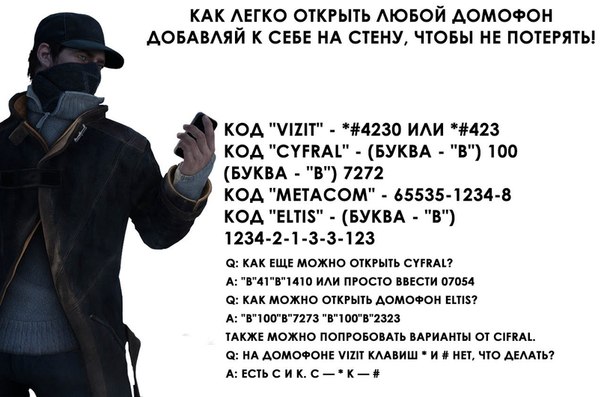
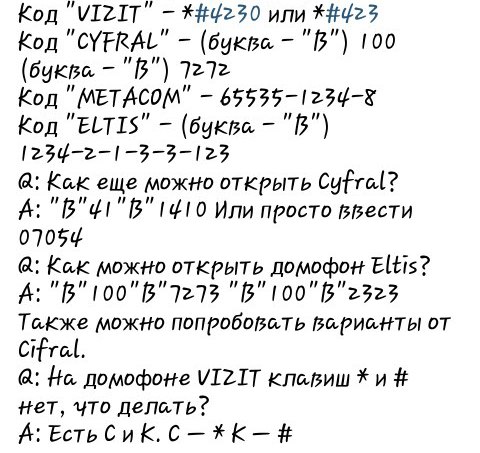
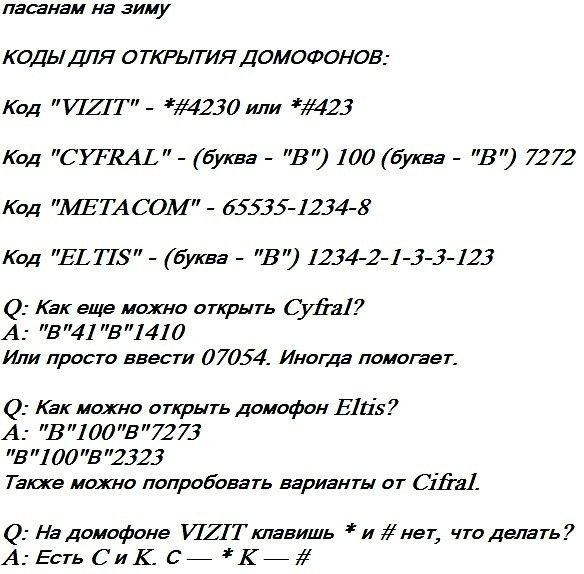
A: CALL 41 CALL 1410 Or just enter 07054. Sometimes it helps.
Q: How can I open an intercom Eltis?
A: B 100 B 7273 V 100 V 2323 You can also try the options from Cifral.
Q: How do I open the door of a VIZIT intercom?
A: If the standard settings have not changed then # 4230 and the door will open. Still sometimes helps 12 # 345.
Q: How to enter the system mode of the VIZIT doorphone?
A: To enter the system mode, you need to connect the leads of the cable "PROGRAMMING", most often for this you need to remove the entire block from the door, because these vents do not lead to the shield.
Q: What is the difference between service and system mode?
A: The service and system modes are different. If you remove the unit from the door and turn on the system mode, you can change everything. Even the master code to enter the system mode.
Q: How do I record my key in the memory of the VIZIT intercom?
A: In the programming mode, press 3, then the hut number, attach the key, press # and then *
Q: What are the default codes for intercoms?
A: 1234, 6767, 3535, 9999, 12345, 0000, 11639 (VIZIT).
Q: How to open METACOM?
A: In the service menu, press 8. Also helps B (or #) 1234567.
Q: How many master keys can a doorphone have at METACOM?
A: Only 1.
Q: Is it possible to kill the keys from the intercom with a magnet, or at least cripple?
A: No, you can not.
Q: How can I change the system code in the Cifral intercom?
A: In programming mode 1 (p ----) and enter a new pass.
Q: Are there special codes for doorphones for opening doors with special services?
A: No, no such codes.
Q: How do I record my key in the Cifral door phone memory?
A: In service mode, press 5, then enter the apartment number, the intercom will write TOUCH apply the key - it's in memory.
Q: How to erase a tablet key from the Cifral's doorphone memory?
A: In service mode, press 5, then enter the apartment number where the key is connected, then press 9.
Q: How do I record a Cifral optical (flat with holes) key in the door memory?
A: In system mode, press 5, then enter the key cell number (1, 2, 3), insert the key, press the bell.
Q: How can I change the general code of the Cifral intercom?
A: In the service menu, press 2, then enter the new code, if the code is shorter than 4 digits, then after entering, press the call.
Q: How do I change the individual Cifral doorphone code?
A: In the service menu, press 3, then the apartment number, call, enter the new code, call, then the call will go, the subscriber will have to press the bell button twice.
Q: How to disconnect the Cifral intercom subscriber?
A: In the service menu, press 4, then 0, then the apartment number, then the call.
Q: How to connect a subscriber who was disconnected from the Cifral door phone?
A: In the service menu, press 4, then 1, then the apartment number, then the call.
Q: What are the default settings for the Cyfral CCD-2094M doorphone?
A: Access code in parameter and settings modification mode. 123456.
Common code is 1234.
Number of individual codes table 000.
First subscriber number 1.
Number of subscribers to be serviced 100.
The duration of the signal Z 1.
Mode of using the common code ON.
Mode of using individual codes.
Subscribers ON / OFF.
To the list of services Audible signal number 3.
Notifying the subscriber about opening the door with an individual key.
Q: On the VIZIT intercom, the * and # keys do not, what should I do?
A: There are C and K. C - * K - #.
Q: Is there a system menu for older doorphones (with a "stick" key)?
A: No, I do not.





Comments
When commenting on, remember that the content and tone of your message can hurt the feelings of real people, show respect and tolerance to your interlocutors even if you do not share their opinion, your behavior in the conditions of freedom of expression and anonymity provided by the Internet, changes Not only virtual, but also the real world. All comments are hidden from the index, spam is controlled.